MIDI to USB (Serial) Converter
MIDI is actually just serial data at 31,250 bps in 8N1 format that is transmitted over a 5-pin DIN cable. This means you can receive MIDI data from your musical instrument using a serial port, or an FTDI cable.
Receiving MIDI data over the FTDI cable doesn’t magically turn your USB serial device into a MIDI device - you need to be running a software bridge or a driver that pretends to be a virtual MIDI device emitting these messages. For this purpose, I shall use the Serial MIDI Converter from SpikenzieLabs.
I’m using Mac OS X 10.6.6 and the latest Java update, so I didn’t need any extra JAR files.
Wiring It Up
The circuit is relatively simple - you need the DIN socket, an opto-isolator, 2 resistors, and optionally a diode. In my case, parts came from a scrap bin, so I used a 330 ohm resistor instead of a 220 ohm for Rb and a 1 K for Rd instead of 280 ohms. For the opto-isolator, element14 had some non-RoHS CNY17-2 on sale, so I just used that.
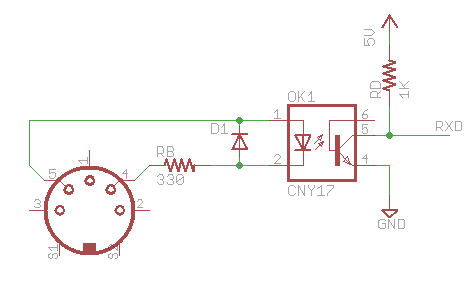
Note that the RXD output is only meant for interfacing with a TTL circuit like an FTDI chip/cable or MAX232 transceiver, not the RS232 serial port directly.
You can find the same circuit diagram (with different values & parts) in the official MIDI Electrical Specification Diagram.
Setting Custom Baud Rates on a Mac
It turns out that setting a non-standard baud rate on a POSIX system was, erm, non-standard. Linux has its own way of setting it, and so does the Mac OS. 31,250 bps was definitely non-standard, and it caused Serial MIDI Converter to stop working without any error messages. You can however find the exception and stack trace in your logs using the Console utility.
The Serial MIDI converter relies on the RXTX Java library for serial I/O. I read through the source code and found out that there was no support for setting custom baud rates on the Mac, which caused it to throw an exception (which in turn wasn’t handled by the converter). If I’m not wrong, there is already code to handle setting custom baud rates in Windows and Linux.
Since Mac OS X 10.3, custom baud rates can be set by sending the IOSSIOSPEED ioctl to the device. So I decided to implement support for it (not sure if that’s the right place to post the patch though) in the RXTX Java library. I’m offering pre-compiled JAR and .jnilib files for download below.
More Problems
Apparently the custom baud rate problem was just one of the road blocks.
The Serial MIDI converter was not made to be robust because it expects to receive Note On messages only, and it parses incoming data in three byte pieces. Sending single-byte messages may just cause it to lose its mind. My piano sends “realtime” MIDI messages, which causes the converter to repeat these unrecognized messages to the virtual MIDI device. I had to hack in some if statements to ignore those.
After fixing that, I found an even bigger problem - my piano sends Note On, but it doesn’t send Note Off messages, so the target device (my Mac) won’t know when the key is released. This cannot really be remedied, so I gave up. Had I checked the MIDI implementation chart earlier I would have found this out.
When you’re troubleshooting, I highly recommend using the Console utility to check for exceptions and the handy MIDI Monitor application from snoize. If you configured everything correctly, you should see Note On messages appear in the MIDI Monitor.
Downloads
To get the converter working on Snow Leopard, you need the .jnilib that is compiled for x86_64. Furthermore, if you need to connect to a MIDI device, your baud rate needs to be set at 31,250 bps, something that is currently unsupported by any build of the RXTX library. For that reason, I’m offering pre-compiled and matching JAR and .jnilib.
You will need to replace these files inside the Serial MIDI Converter application, by right-clicking its icon, then choose Show Package Contents. Navigate to Contents > Resources > Java and you should find these files. Just copy the files you download here into the directory, replacing the old copies.
The version of this RXTX library is 2.2pre2, which works fine for the MIDI Serial Converter.