Decoding BCARD Conference Badges
Last month, I had the opportunity to fly halfway around the world to attend RSA Conference 2013. Everyone was given a lanyard and badge which contains your information entered during registration. When you visit booths, they can then scan your badge to collect your information and follow up by sending you spam.

The scanner varies across different booths, but mostly it’s an Android device that ran a custom software. Since it had a large NXP logo, let’s try to read it with the NFC TagInfo app. Looks like the tag identifies itself as a NDEF message but the data is gibberish.
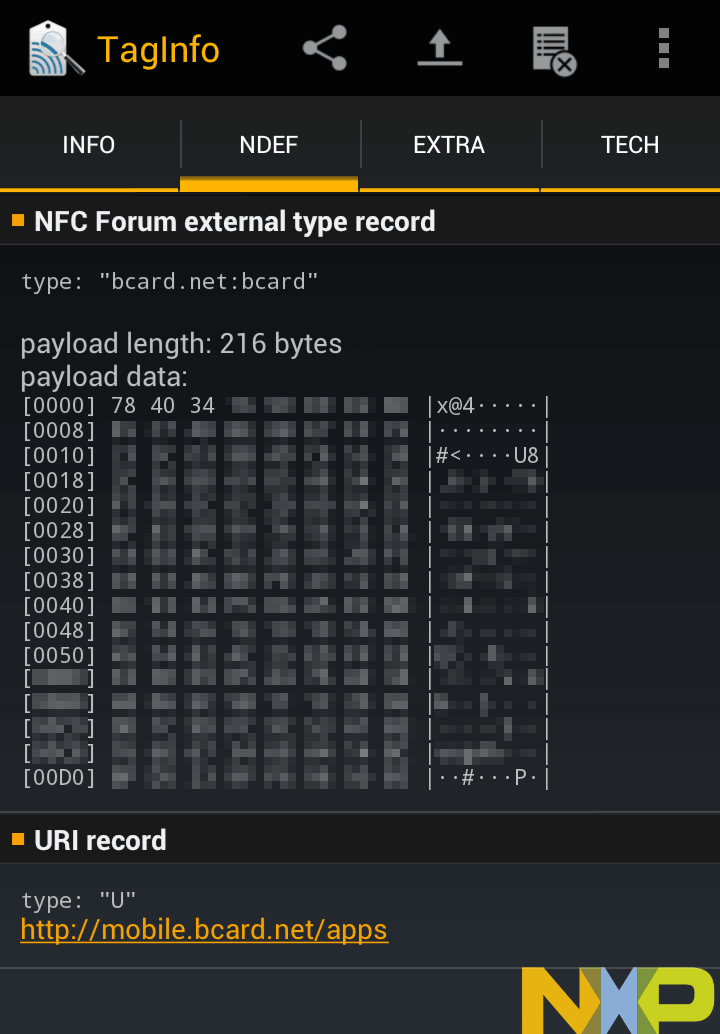
Apparently these badges are called BCARDs and it turns out that you can download the scanner app from the Google Play store. The app requires activation by downloading some configuration data from their servers, and without doing that the app doesn’t seem to want to read my badge. Well, time to take it apart.
The app is, unsurprisingly, obfuscated. Looking through the decompiled code, one statement stuck out:
String str = e.a(((android.nfc.NdefMessage)paramIntent
	.getParcelableArrayExtra("android.nfc.extra.NDEF_MESSAGES")[0])
	.getRecords()[0].getPayload(), "F4A9EF2AFC6D");
The first logical thing to do is to see if anyone has tried decoding it before. Searching for what looks like the magic key turns up only one interesting post from withinwindows.
Without access to an authorized //build/ badge reader, I had to use a software implementation (mfcuk) of the card-only attack I mentioned earlier to recover keys A and B. After weeks of painfully fiddling with the timings of the attack, I successfully recovered key B on one chunk of data.
Key B is static, thankfully. On two badges I examined, Key B was given write permissions card-wide. So I named it The //build/ Badge Administrative Key. That key is f4a9ef2afc6d.
Although this badge is a MIFARE card, it (unfortunately) has no protected sectors. The sector keys are the standard “public keys” that allows its contents to be read as an NDEF message. Judging by the time of the blog post, the //build/ badges were most probably an earlier form of BCARD too. It looks like I have to continue looking at the reader app. The decompiled code for the decryption part was not valid Java code so I couldn’t just put it into a file and compile it. For instance, just look at this decompiled snippet that converts the key string to an int[]:
if (keyString.length() < 16) {
  m = keyString.length();
  localObject = keyString;
  if (m < 16);
}
label30: int k;
for (int j = 0; ; j = k) {
  if (i >= ((String)localObject).length()) {
    return arrayOfInt;
    String str2 = localObject + " ";
    m++;
    localObject = str2;
    break;
    localObject = keyString.substring(0, 16);
    break label30;
  }
  ...
}
One big problem with decompilation is the use of labels at the bytecode level. At the Java level you aren’t allowed to use labels at all (except at loops), so the decompiler needs to be smart enough to figure out what the bytecode is trying to do. But that’s another rant for another time.
After reconstructing the code by hand, I was able to decode the badge data. They decided not to rely on Crypto-1 for encryption but instead make the data readable from the card and roll their own decryption routine using XTEA in their readers. The odd thing though, is that they decided to keep the key. Crypto-1 uses a 48-bit key, whereas XTEA uses a 128-bit key. To make up for the difference, they treat the old key as an ASCII string and padded it with spaces to make the 128-bits.
Here’s the decryption code that was reconstructed. Most of it is just bit shuffling code.
static void xtea_decrypt(int[] data, int[] key) {
	int m = data[0];
	int n = data[1];
	int k = 32;
	int sum = 0x9E3779B9 * k;
	for (; k > 0; k--) {
		n -= m + (m << 4 ^ m >>> 5) ^ sum + key[0x3 & sum >> 11];
		sum -= 0x9E3779B9;
		m -= n + (n << 4 ^ n >>> 5) ^ sum + key[0x3 & sum];
	}
	data[0] = m;
	data[1] = n;
}

static int[] make_key(String key) {
	int keyArr[] = new int[4];

	while (key.length() < 16)
		key += ' ';

	for (int i = 0; i < key.length(); i += 4)
		keyArr[i/4] =   key.charAt(i + 0) << 0  |
						key.charAt(i + 1) << 8  |
						key.charAt(i + 2) << 16 |
						key.charAt(i + 3) << 24;

	return keyArr;
}

static void decrypt(byte[] data, String keyString) {
	int[] key = make_key(keyString);

	for (int i = 0; i < data.length; i += 8) {
		int[] block = {
					((int) data[i + 0] & 0xFF) << 0  |
					((int) data[i + 1] & 0xFF) << 8  |
					((int) data[i + 2] & 0xFF) << 16 |
					((int) data[i + 3] & 0xFF) << 24,
					((int) data[i + 4] & 0xFF) << 0  |
					((int) data[i + 5] & 0xFF) << 8  |
					((int) data[i + 6] & 0xFF) << 16 |
					((int) data[i + 7] & 0xFF) << 24 };

		xtea_decrypt(block, key);

		data[i + 0] = (byte) ((block[0] >> 24) & 0xFF);
		data[i + 1] = (byte) ((block[0] >> 16) & 0xFF);
		data[i + 2] = (byte) ((block[0] >> 8 ) & 0xFF);
		data[i + 3] = (byte) ((block[0] >> 0 ) & 0xFF);
		data[i + 4] = (byte) ((block[1] >> 24) & 0xFF);
		data[i + 5] = (byte) ((block[1] >> 16) & 0xFF);
		data[i + 6] = (byte) ((block[1] >> 8 ) & 0xFF);
		data[i + 7] = (byte) ((block[1] >> 0 ) & 0xFF);
    }
}

// decrypt(data, "F4A9EF2AFC6D");
A little bit about the data format: fields are separated by 0x1F. There are 2 identifiers in each badge, one is a unique badge number, and the other is the event ID. Badges for a particular conference will bear the same event ID.
Well that’s all there is to it. Now you can either go around scanning badges at future conferences, or you could modify the data on your own badge (provided they don’t change the format yet again).