Random track #2 - Regex This is a challenge involving regular expressions. It reads the huge expression from the file omglob_what_is_dis_crap.txt. The code that reads and evaluates this expression will only provide you with the key if you provide it with an input that doesn’t match this expression. Of course the program runs on a remote server, so you don’t have direct access to the flag. Inspecting the expression, there’s a lot of “OR” conditions, and splitting them into lines gets you something like this:
Jeremias and Jeremy gave a talk at one of the Null Security meetups. Check out the slides if you haven’t already. In one part, Jeremy talks about the custom firmware he wrote for his badge and the additional challenges he set up for partipants to get more points. The 2nd part of the talk covers the electronic badge and challenges.
The Challenges
The challenges try to exploit the nature of being a self-contained electronic device. Rather than trying to replicate more CTF puzzles and simply placing them into the badge, we specially designed them for the badge.
You can find the answers to the badge puzzles (and the main CTF puzzles) in the X-CTF GitHub repo, which was released shortly after the event.
Since there’s only a single entry point into the set of challenges (meaning you must solve each puzzle before getting to the next), the puzzles must be designed with increasing levels of difficulty; too difficult and the participants will totally give up.
Stage 1: Catch Me If You Can
I particularly like this one. Unlike a program running on the computer, you can’t easily snapshot the state of the program, nor try to influence (slow down) its execution.
Written by Darell Tan on 22 Jun 2016Share Comments
I had the opportunity to collaborate with some NUS students to design the electronic badge for their X-CTF event this year.
The purpose of the badge was to inspire more people to take an interest in hardware hacking, or to get them started on electronics. With so much hype on the Internet-of-Things (IoT) these days, what better idea than to let participants take home their very own IoT device. The super low cost WiFi chip, Expressif’s ESP8266, made this possible. We also wanted it to be shaped like a gaming device, with a D-pad and an LCD.
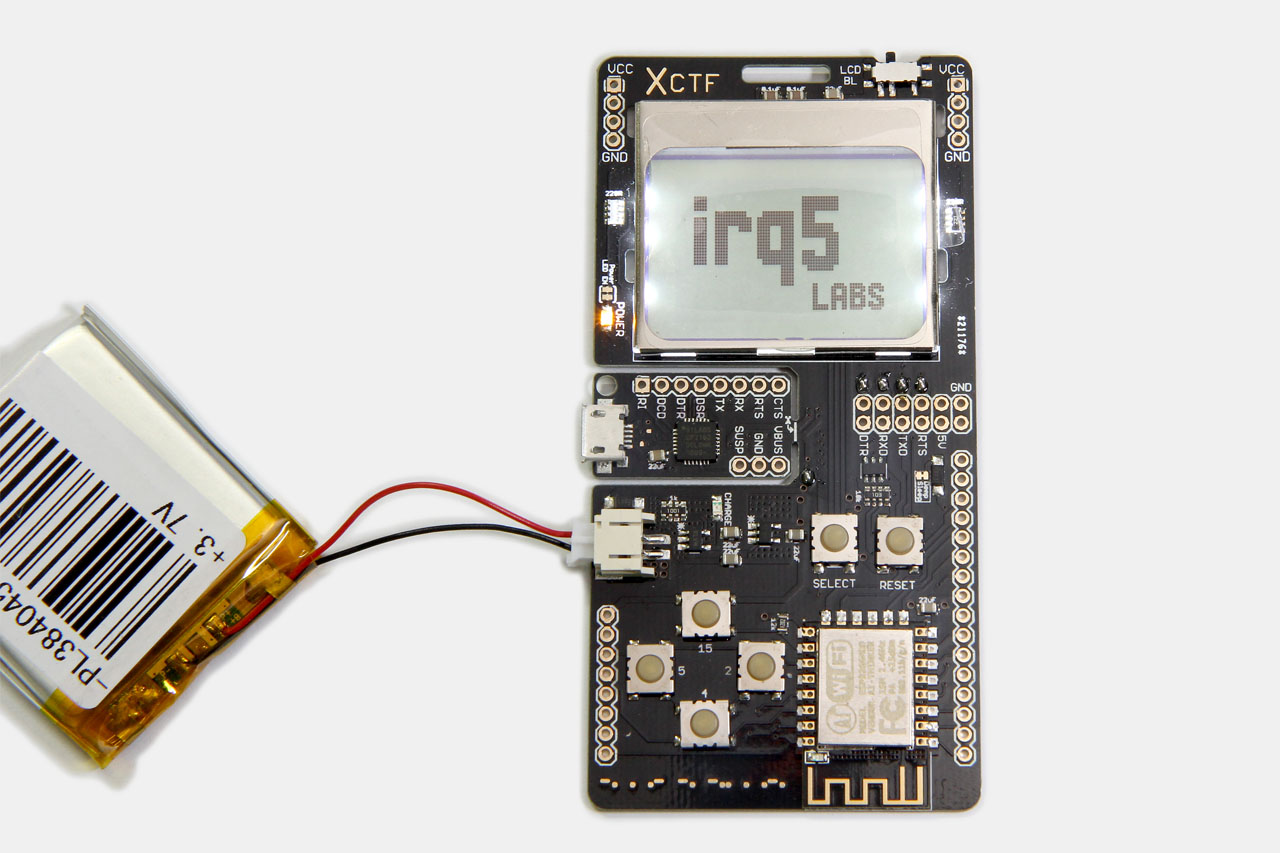
You can see the final badge design above: a ESP8266-based board with a backlit monochrome Nokia LCD, D-pad and a SELECT button. Powered by a lithium-ion battery, charged via the USB port, which also provides a serial connection to the ESP8266.
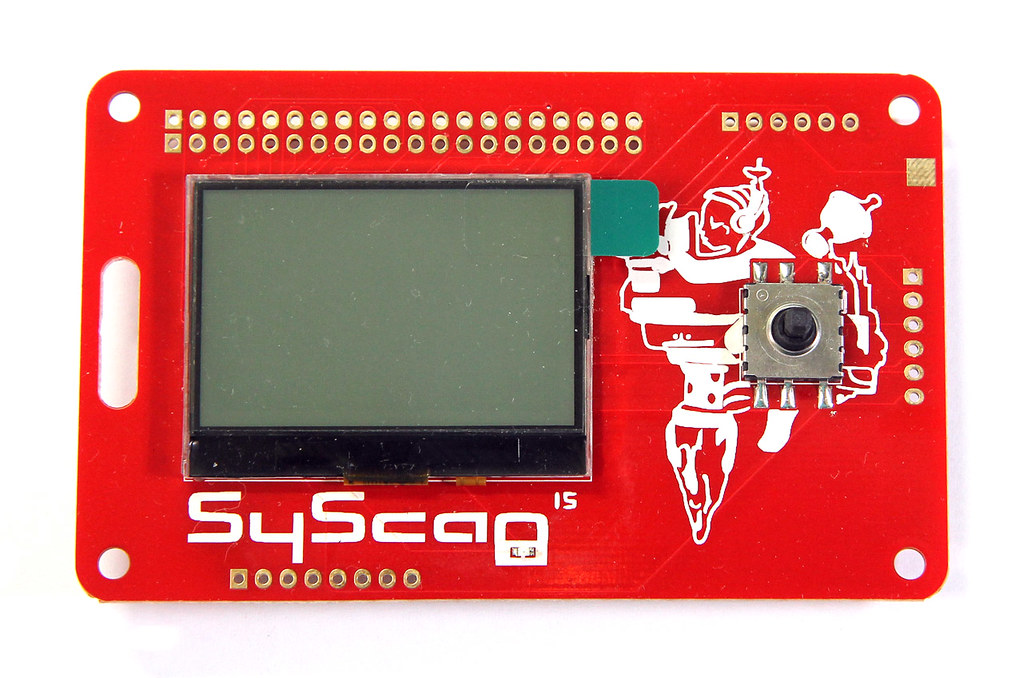
I was inspired by the SyScan 2015 badge. It was so simple and spartan: a monochrome LCD, an LED, a 5-way joystick switch and a 32-bit ARM processor (on the back). As the regulator was built-in and it runs all the way down to 2.4 V, there was no need for an external regulator.
Written by Darell Tan on 14 Jun 2016Share Comments
Sorry I haven’t been updating the blog often enough. I have been busy helping out with an electronics project, which will be in the hands of users very soon. There will be a detailed post on the project when that happens this coming weekend. For now, here’s a mysterious peek at its progress: [tweet https://twitter.com/zxcvgm/status/725703690972065792] [tweet https://twitter.com/zxcvgm/status/741057757533458433] Ever since I made my first purchase on AliExpress, I have been buying random stuff and they’ve been arriving in batches.
Written by Darell Tan on 30 Dec 2015Share Comments
gurke (misc) For this challenge, you are provided with a Python-based service that accepts a pickle and displays the result. You will need to coerce it to display the flag though, which is initialized at the start of the service. The service can be succinctly represented as follows: class Flag(object): def __init__(self): s = socket.socket(socket.AF_INET, socket.SOCK_STREAM) s.connect(("172.17.0.1", 1234)) self.flag = s.recv(1024).strip() s.close() flag = Flag() ... data = os.read(0, 4096) try: res = pickle.
Written by Darell Tan on 30 Dec 2015Share Comments
config.bin (forensics) You are provided with what they say is “a configuration backup of an embedded device”, and that “it seems to be encrypted”. Opening the file with a hex editor to look for any magic identifiers: 00: 4346 4731 0000 32d0 ef92 7ab0 5ab6 d80d CFG1..2...z.Z... 10: 3030 3030 3030 0000 0005 0003 0000 0000 000000.......... 20: 6261 47c3 d43b af2f 9300 bcaf adf4 5c8c baG..;./......\. 30: 3d02 9ea5 0bb7 3ce0 00f4 c5b3 901e d5fb =.
The first soldering iron he talked about seems to be interesting. It’s a soldering iron with temperature control, but everything is built into the form factor of a regular soldering iron. He also showed the insides of the iron, which uses a triac to control the supply, hence eliminating the need for the bulky 24 V transformer found in most soldering stations.
Ever since my temperature-controlled soldering station died, I was left without one and fell back to using my cheap 20 W iron. I was previously using the Duratool D00673 from element14, which is actually just a re-branded Zhongdi ZD-916. It was really expensive (S$120), so when it died after very infrequent use, I didn’t think it was worth it to get a replacement unit.
The 24 V transformer is quite heavy and accounts for most of the weight of this unit, so trying to ship it from overseas was also not worth it. After it died, I tore it down and found that its construction was pretty crappy:
If you want to see more teardown photos and a review of sorts, check out this EEVBlog forum thread. Of course I have verified that this crappy connector job wasn’t the cause of failure. My preliminary troubleshooting found that the power supply seemed to be working, but there was nothing on the LCD display nor was it responding (no beeps on keypresses).
Thanks to this video, I realized that there are alternative products that combine the best of both worlds.
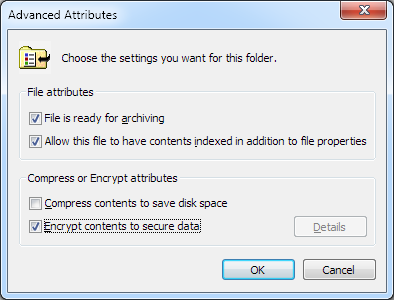
I have recently been working with VM images and to transport & distribute them conveniently I had to zip them up. I mainly work in a Windows environment and I use 7-Zip for packing and unpacking archives. It’s actually quite nice (and free), if you don’t mind the spartan interface. On my workstation, I have NTFS file encryption (EFS) enabled on my home directory. The way this works is that you can selectively encrypt files and folders by setting a special attribute on these items.
I was in a hurry to prepare a VM image for a class and I used 7-Zip to archive the entire VM folder. The problem was, this encryption attribute was also recorded in the ZIP file and I only realized it when I unpacked it on a machine for testing right before the class started. On a machine that does not use NTFS, it warns the user and asks if it should continue extracting unencrypted. On a machine with NTFS, the destination files get encrypted and Windows starts nagging the user to back up the EFS keys. Compressing a 9 GB image into a 3 GB ZIP file took about 40 minutes, so there was really no time left to decrypt the files (EFS really sucks in this regard) and re-compress it into a ZIP file without encryption.
You can check whether a file is marked for encryption by checking the Attributes column in 7-Zip. (Note that this encryption attribute is native to NTFS and is different from ZIP file encryption.) The attribute string is somewhat cryptic but E means encrypted and A is archive. Interestingly, 7-Zip itself does not restore the encrypted attribute, but the native Windows unzipping functionality does.
Patch All The Things!
While I did not manage to solve this annoyance in time for the class, I had this idea to write a tool that would just patch the ZIP file. No changes need to be made to the file data and so there is actually no need to re-compress it.
Written by Darell Tan on 20 Apr 2015Share Comments
This challenge came with a simple Python TCP server and a monstrous regex in a separate file. It consists of multiple sub-patterns (2563 to be exact), separated by OR operators1. To get the flag, the input supplied must NOT match any of these sub-patterns. If you break up the large regex expression, you see something like this: ^(.*[^plaidctf].*| .{,170}| .{172,}| .{88}[padt].{60}[licf].{6}[plai].{14}| .{60}[aitf].{17}[pldc].{85}[dctf].{6}| ... .{54}[pldc].{88}[plai][aitf].{26}| .{11}[aitf].{41}[aitf].{97}[padt].{19})$ The 3 conditions listed up front give you a hint to the requirements: must be made up of the letters plaidctf and be of length 171.
Now is probably a good time to mention that I have a paper shredder. When I was shopping for a shredder, the basic requirement is that it must be relatively “secure”. Straight cut shredders (that produce long straight strips) are definitely not secure.
Ultimately I settled on the CARL DS-3000 personal paper shredder. The DS-3000 is a cross-cut shredder which produces “particles” no larger than 2 mm x 4.5 mm and this meets DIN security level 4. These days, the NSA mandates 1 mm x 5 mm “particles” for classified documents.
At this point, it’s probably helpful to show you what my shredder bin looks like:
From the particles, you can make out various truncated words such as “A/C”, “exp” and the number “5”, but it’s almost impossible to reconstruct any bank balances or personal information from it.
This particular model was the right balance between my budget and the level of security. Plus, the shredder is compact enough to sit on your desk. I bought it in 2009 and I use it every couple of months when I have accumulated enough material that needs to be destroyed.
I was in the middle of shredding papers when it suddenly stopped working. Now the shredder does not respond when I stick paper into its slot. The LED indicator looks dimmer than usual when it is turned on.