The 31st Chaos Communication Congress (31C3) ended just 3 days ago, and there were several interesting talks.
They have got live streaming of the event over the web, as well as encourage you to use an external player with RTMP or HLS support. The video streams were very reliable and best of all, it’s available in HD. In comparison, I tried the Apple live event once and it was really crappy. For one, the HLS1 URL is not publicly available , so someone had to dig that out and post it. Even after that, the audio stream was (I believe, unintentionally) a mix of both English and Chinese simultaneously.
The 31C3 video recordings were also uploaded very quickly after the event. This is much quicker than other events such as Black Hat (although as an attendee, you do get a copy of the stuff on a DVD). A really big kudos to the organizers and the video production team!
If you don’t have time to listen to each and every talk, here are a few selected talks that were interesting to me, as well as a short summary to see if it’s worth 30 or 60 minutes of your time.
Written by Darell Tan on 26 Dec 2014Share Comments
Some time ago, I started playing around with data analysis and machine learning. One of the more popular tools for such tasks is IPython Notebook, a browser-based interactive REPL shell based on IPython. Each session becomes a “notebook” that records the entire REPL session with both inputs and (cached) outputs, which can be saved and reviewed at a later time, or exported into another format like HTML. This capability, combined with matplotlib for plotting and pandas for slicing and dicing data makes this a handy tool for analyzing and visualizing data. To give you an idea of how useful this tool can be, take a look at some example notebooks using the online notebook viewer.
In this quick post, I’ll describe how I visualize binary features (present/not present) and clustering of such data. I am assuming that you already have experience with all of the above-mentioned libraries. For this example, I’ve extracted permissions (uses-permission) and features (uses-feature) used by a set of Android apps using Androguard. The resulting visualization looks like this:
Each row represents one app and each column represents one feature. More specifically, each column represent whether a permission or feature is used by the app. Such a visualization makes it easy to see patterns, such as which permission or feature is more frequently used by apps (shown as downward streaks), or whether an app uses more or less features compared to other apps (which shows up as horizontal streaks).
While this may look relatively trivial, when the number of samples increase to thousands of apps, it becomes difficult to make sense of all the rows & columns in the data table by staring at it.
Inspired by Nikolay Elenkov’s detailed technical posts on Android Explorations, I decided to dig into the Android source code myself and document the package verification mechanism in Android.
Package verification was introduced in Android 4.2 to allow for apps to be verified or checked before they are installed. If you have tried to install a malicious app on a production Android device, you might have seen the following screen, displayed by the verifier:
Android was built in such a way that it tries to be generic for third-parties to implement stuff. Package verification is a feature that is currently only used and implemented by Google, but it is abstracted in such a way that any manufacturer can implement their own. Documentation and examples on how to do this is almost non-existent, although anyone determined enough can read the Android source code and figure it out for themselves.
Written by Darell Tan on 19 Nov 2014Share Comments
Some weeks back, we were forced to reboot one of our server machines because it stopped responding. When the machine came back up, we were greeted with a password prompt to decrypt the partition. No problem, since we always used a password combination (ok, permutation) that consisted of a few words, something along the lines of “john”, “doe”, “1954”, and the server’s serial number. Except that it didn’t work, and we forgot the permutation rules AND whether we used “john” “doe” or “jack” “daniels”.
All the search results for bruteforcing LUKS are largely the same – “use cryptsetup luksOpen --test-passphrase”. In my case, the physical server is in the server room, and I don’t want to stand in front of the rack trying to figure all this out. My question is, can I do this offline on another machine? None of those blog entries were helpful in this regard.
The LUKS Header
To answer this question, I took a look at the LUKS header. This header is what provides multiple “key slots”, allowing you to specify up to 8 passwords or key files that can decrypt the volume. cryptsetup is the standard userspace tool (and library) to manipulate and mount LUKS volumes. Since LUKS was designed based on TKS1, the TKS1 document referenced by the cryptsetup project was very helpful. After consulting the documentation & code, I came up with the following diagram that describes the LUKS key verification process:
Written by Darell Tan on 25 Sep 2014Share Comments
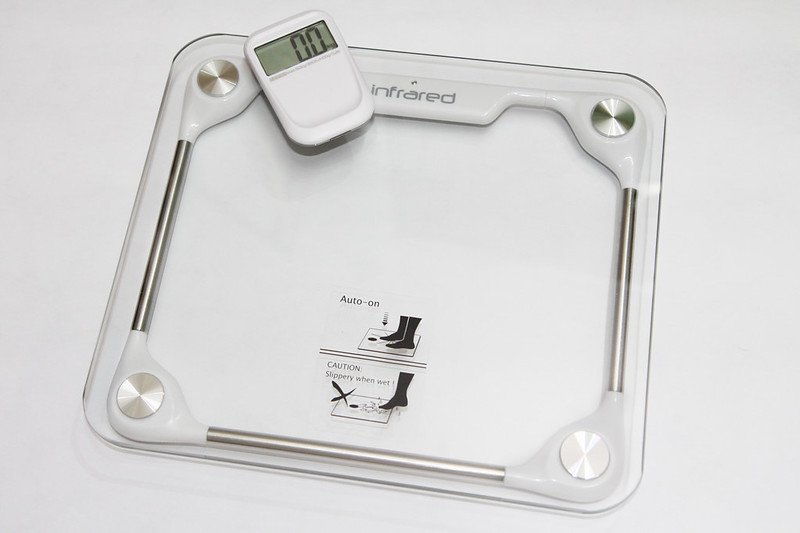
Last week as I was making my rounds at the supermarket, I came across this digital bathroom scale on sale. With some membership card, the discount was almost 50% and at S$16, I thought that was a pretty good deal. It is “wireless” in that it has a separate display unit that could be detached from the scale itself. This bathroom scale had “HACK ME” written all over it.
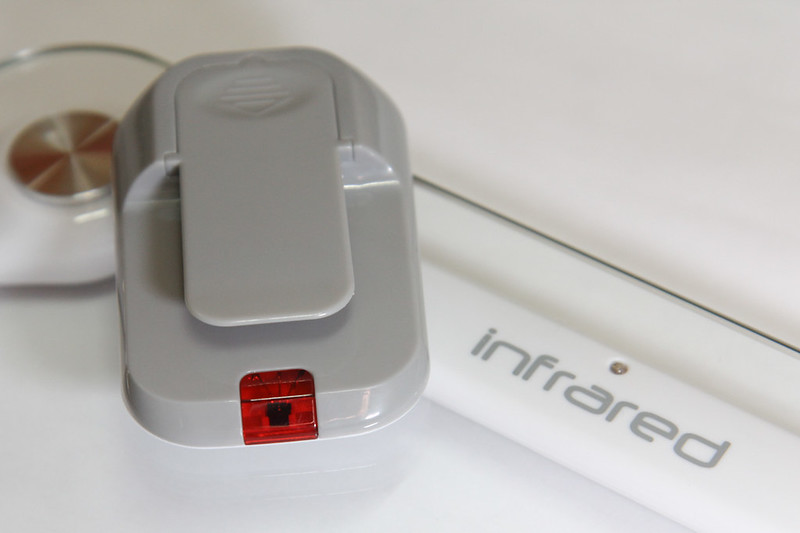
It turns out that this bathroom scale is the EB9121 made by a Chinese (OEM?) company called Zhongshan Camry Electronic Co. Ltd (or simply Camry). The box specifically mentions that it uses infrared for transmission, and given that I had some experience looking at IR signals, I thought it would be rather straightforward.
Written by Darell Tan on 24 Aug 2014Share Comments
Whether you are using CentOS for a build server or simply testing out a new configuration, you can quickly create a VM (virtual machine) that is under 1 GB. You can do this without downloading any special tools or ISO files – just the CentOS installation DVD and VirtualBox (or VMware if you prefer).
I like the text-based console, so you won’t be getting a GUI or fancy Linux desktop with this one. Given its small size, you could also archive the entire environment (or even several of them) for future use without having to waste gigabytes of free space. These environments also serve as a base which can be upgraded or added onto to provide more functionality later.
My decade-old 4th generation iPod decided to blue screen on me, literally.
I love old stuff and I’m rather attached to this very first Apple product that I purchased 10 years ago. So I decided to turn to iFixit, the well-known DIY repair store for Apple products, for a replacement LCD screen.
I have always been an advocate on storage security (all types of security, actually). I like how iOS devices keep all files encrypted, even if you do not set a passcode on the device. They do this to facilitate quick erasure of files on the device – to erase all the data, they simply wipe the master key.
Erasing magnetic storage media isn’t difficult, but it is time-consuming. For solid state media such as SSDs and flash drives, the wear-leveling makes it difficult to ensure that all flash blocks have been securely overwritten. The answer to this is to encrypt everything.
Recently I have been busy building a Linux-based NAS and I decided to put this to practice.
Written by Darell Tan on 23 Dec 2013Share Comments
EAP-SIM is one of the authentication methods that can be used in an 802.1x or WPA Enterprise network. Specifically, it relies on the user’s SIM card to process a presented challenge. This has been used by some telcos to provide WiFi service without having to maintain a separate set of credentials. However, not all phones support EAP-SIM.
Since I’m already using a RADIUS setup at home, the use of EAP-SIM will eliminate the need to install my CA certs onto each device. But of course, there is still a fair bit of work to do…
Written by Darell Tan on 27 Oct 2013Share Comments
Consumer Electronics Control (CEC) allows control of AV devices that are connected via HDMI. This is the feature of HDMI that enables your TV to automatically turn on and switch to the correct input when you switch on your set-top box, for example. It also allows you to control your set-top box using the TV remote (in some cases).
Electrically, the CEC bus is a single-wire bus that is shared between all HDMI devices, thus any CEC message can be received by all connected devices. Each device then claims one or more logical addresses on which it will receive direct CEC commands.
One interesting feature in the HDMI CEC specifications is Remote Control Pass Through, which allows button presses on the remote control to be passed through to HDMI-connected devices. I thought this feature could be used to unify the various remotes in my living room.
However, not all CEC devices are created equal. As usual, some manufacturers will deviate from the specifications, and/or introduce some quirks in their implementation (as you will see later). They also love to brand CEC with their own funky name, such as SimpLink or Anynet+.
Raspberry Pi as a CEC Bridge
As a quick and dirty way to check out the capabilities of my TV, I used a Raspberry Pi which has a HDMI connection that can be software-controlled. This also meant that I didn’t have to build my own CEC transceiver circuit.